
Product Help
How to view local plans in Queensland
Local plans are part of a council's planning scheme and define place-specific planning controls that apply across designated areas.
Viewing them in Landchecker lets you quickly see whether a property falls within a local plan area and understand its boundaries, precincts, and sub-precincts without leaving the platform. This data is available on all plans, including the free plan.
How do I turn on local plans for a Queensland property?
1. Search for a Queensland property address using the search bar, or navigate your map to the area you want to assess.
2. In the left-hand panel, click Planning Layers.
3. Under planning layers, click Place-based plans to expand the section.
4. In the dropdown, select Local plans. Three sublayers will appear: Boundaries, Precincts, and Sub-precincts.
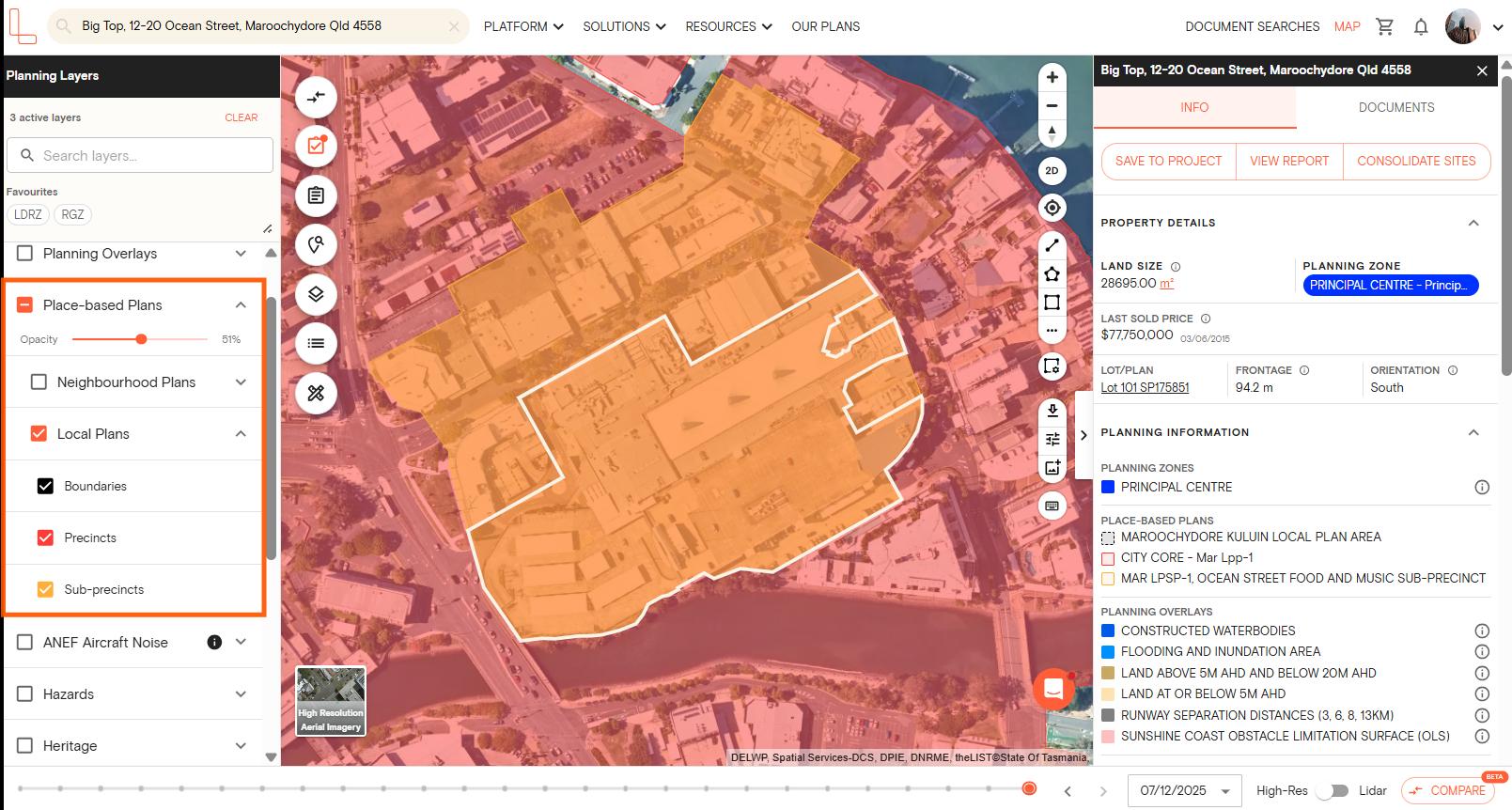
5. Tick the checkbox next to each sublayer you want to display. You can enable all three at once, or toggle on only the ones relevant to your assessment.
Once enabled, local plan areas will appear as overlays on the map.
6. If the property falls within a neighbourhood plan area, click View report to download a report showing the neighbourhood plan layer and the controls that apply to that site.
Can I adjust how the local plans layers look on the map?
Yes. If you want to view local plans alongside other layers without visual clutter, you can adjust the opacity of each sublayer using the opacity slider. Drag it left to make the layer more transparent, or right to increase it.
To save local plans for quicker access in future sessions, click the star icon next to the layer to add it to your favourites.
What is the difference between boundaries, precincts, and sub-precincts?
Local plan boundaries show the outer extent of a local plan area. Precincts divide that area into smaller zones with specific planning intent or built form requirements. Sub-precincts provide a further level of detail within a precinct, often with more specific controls around land use or development.
You can enable all three sublayers together for a complete picture, or isolate one if you only need a particular level of detail.
Which plan do I need to view local plans?
Local plans are available on all Landchecker plans, including the free plan. You can access this layer without needing to upgrade.
If you have questions about local plans or need help navigating the planning layers panel, start a live chat with our support team from within the platform.