
Product Help
How to give feedback on Elsie’s responses
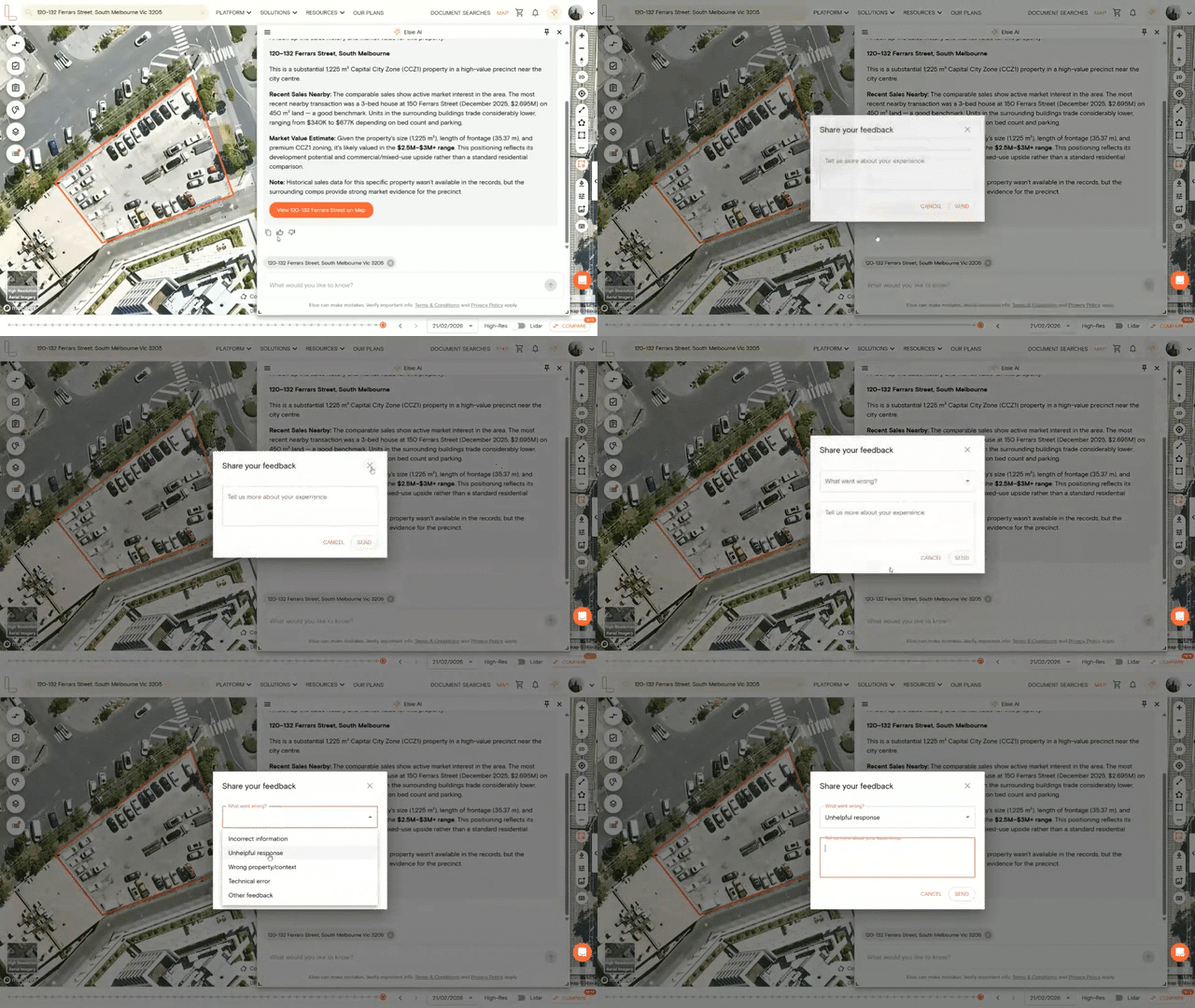
Feedback helps the team measure how useful Elsie is and improve her responses over time. After each response, you’ll see a set of options to share your reaction.
Thumbs up
If a response was helpful, select the thumbs up icon. A prompt will appear asking you to share more about your experience. Add any comments and select Send.
Thumbs down
If a response wasn’t helpful, select the thumbs down icon. You’ll be asked to choose what went wrong from the following options:
Incorrect information
Unhelpful response
Wrong property/context
Technical error
Other feedback
After selecting a category, you can add more detail in the text box before selecting Send. The more specific your feedback, the more useful it is. You can also select the copy icon to copy Elsie’s response to your clipboard.
NOTE: Your feedback is reviewed regularly and directly informs how Elsie is developed. If something isn’t working as expected, please let us know via the live chat in the platform.