
Product Help
How to search by owner name in NSW
A search by owner name in New South Wales provides details on the registered name, locality, title reference, water access licence (WAL) reference and acquired dealing.
Before accessing the name search in NSW against the NSW Land Registry Services, the following is required:
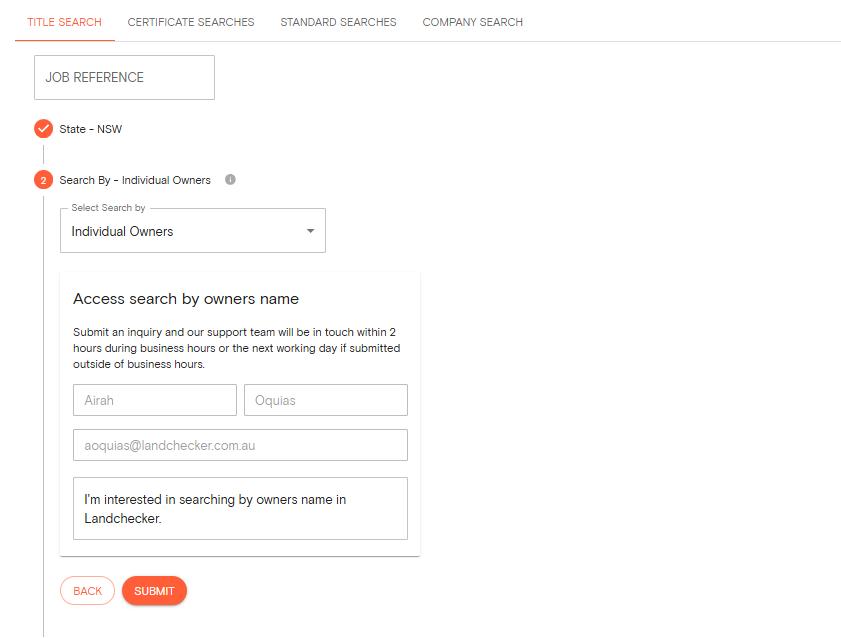
You must have an active paid plan in Landchecker
Submit an inquiry to our Support team by filling out the form
You must have completed and signed the NSW Search by Owner Name Access Request Form
Reach out to support@landchecker.com.au if you need help with this.
Once you've completed the above, you can follow the steps below to start searching for a copy of title by owner's name:
1. Head over to the Document Searches page. Title search appears as the default tab.
2. Add a Job Reference
3. Select NSW as the state and click next.
4. Select search by Individual Owners or Organization Owners name and choose a reason for conducting the search.
5. Enter the owner's name and submit your search.
There's a fee for this name search, which provides you with a list of all matching names and their associated Title Reference numbers in your Order Manager.
If no results are found, you won't be charged.
6. Tick the checkbox next to any title you need a copy of and add it to your cart.
7. Proceed to checkout, then head to your Order Manager to download your documents.
Tips for Searching by Individual Name
The search tool is designed to capture name variations automatically, so you don't need to worry about exact formatting:
Mc/Mac prefixes: Enter either variation (like 'McGregor' or 'MacGregor') and the search will check both.
Apostrophes: Names like 'D'Angelo' will be searched with and without the apostrophe automatically.
Spaces: Whether you enter 'De La Cruz' with spaces or without, the search covers both formats.
Hyphenated names: You can search using the full hyphenated name ('Taylor-Williams' or 'Anne-Marie') or just part of it ('Taylor' or 'Anne'). The search will find hyphenated variations either way.
Tips for Searching by Organisation Name
Get better results by keeping your search simple and letting the tool handle variations:
Skip abbreviations: Leave out terms like 'P/L' or 'Pty Ltd' to broaden your search.
Ampersands: Enter either '&' or 'And' (like 'Johnson & Associates' or 'Johnson And Associates') and the search will check both.
'The' prefix: Names like 'The Property Group' will be searched with and without 'The' automatically.
Include numbers: If the organisation name contains numbers, add them in your search (for example, '247 Holdings').
Special characters: Punctuation like hyphens, commas or brackets will be searched both with and without them, so you can include them as written (for example, 'Harris-Brown Investments' or 'Metro (NSW) Developments').